


Pulse SMS (Phone/Tablet/Web)
3.617.36K Reviews
App Specs
- Version
- 7.0.3.3044
- Updated On
- License
- Free
- Downloads
- 1,000,000+
- Developer
- Maple Media
- Categories
- Communication
- Platform
- Android
Screenshots
 Analysis by AppCompare
I judge a messaging app less by how many switches it offers than by whether it fits the way I already communicate. Pulse SMS is an Android communication app from Maple Media, built around keeping ordinary text conversations available across a phone, tablet, and web session. That focus can make a real difference when a phone is charging in another room or I need a keyboard for a longer reply. It is not a replacement for every chat service: its appeal is strongest when SMS is still part of my daily routine.
Where trust starts: knowing what kind of messaging this is
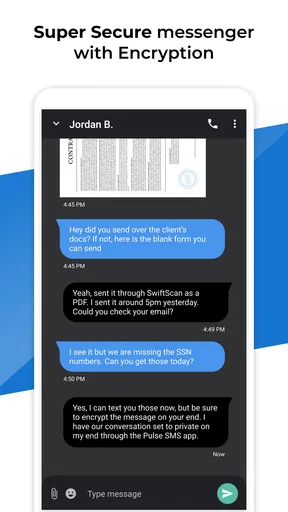
It helps to separate convenience from privacy claims. Pulse SMS is designed to manage text messaging across devices, and the original review describes practical tools such as private conversations protected by a password. Those controls can help keep a conversation out of casual view, but I would not treat a lock inside an app as proof that a message has special end-to-end protection. I use it for the convenience of accessing texts in more places, while reserving especially sensitive exchanges for a service whose protections I have checked and whose participants also use it.
The app is free to install, is rated for Everyone, and has optional in-app purchases ranging from $0.99 to $149.99 per item. Its 3.6 average from around 81,000 ratings suggests a mixed reception rather than universal approval; I would read recent user feedback before relying on it for a device setup that matters to me. The 1 million-plus installs show that it has found an audience, but popularity alone is not a privacy or reliability guarantee.
Device access is useful, but it deserves a deliberate setup
The main trust question for a multi-device texting app is not simply whether syncing works; it is which devices I choose to connect and whether I still recognize them later. Before linking a tablet or computer, I would make sure it is a device I control, avoid signing in on a shared machine, and take a moment to understand how to end that session if I stop using it. That is sensible housekeeping for any service that makes personal conversations reachable beyond a phone.
I would also think about the screen where message previews appear. A tablet left on a kitchen counter or a laptop used around other people can show a private notification at an awkward moment. Adjusting notification previews at the device level, or choosing quieter alerts, is a practical way to keep the convenience without putting every incoming text on display. The original review notes customizable notifications, but the right choice depends on how and where I use each device.
Using Pulse SMS in everyday life
I find cross-device texting most useful when it fits around the rest of my day rather than demanding constant attention. In this section, I’d look at a simple workflow for moving between a phone and a larger screen, then turn to the small setup choices that help keep that convenience comfortable and deliberate.
A workflow that makes cross-device texting worthwhile
The clearest everyday case for me is a workday split between a phone and a computer. I might receive a delivery update while my phone is in a bag, answer from the larger screen, then pick up the phone later and continue the same conversation. That is more useful than simply having a web interface available: it reduces the small interruptions of reaching for a phone, unlocking it, and returning to what I was doing. For short personal texts, that smoother handoff is the app’s strongest argument.
Worth Reading Before You Choose

EA SPORTS FC Mobile 26 Is a Bigger Football Game, but It Takes Time

Flipboard Shows What News Apps Must Do Beyond the Feed

Switching to Android Auto Means Rethinking Your Driving Routine

Google Calendar Makes a Crowded Week Easier to Manage

Ludo King Makes the Most of the Minutes Between Plans

Baby Panda World Brings Quick Play to Modern Phones, but Its Game Library Feels Busy
There is a trade-off, though. A synced message history is helpful only when the devices I use are dependable and appropriately private. If I borrow a computer, share a tablet, or regularly switch between devices I do not fully control, I would keep access limited rather than connecting everything for the sake of convenience. A phone-only texting app may be the better choice for someone who values a smaller access footprint more than desktop typing.
One useful habit is to treat the web version as a focused reply station rather than a place to leave messages open all day. I can catch up on texts, answer the ones that need a keyboard, and then sign out or close the session when I am finished. That workflow keeps the benefit of a larger screen while reducing the chance that a conversation remains visible on a device I walk away from.
Controls, privacy, and the moments that call for care
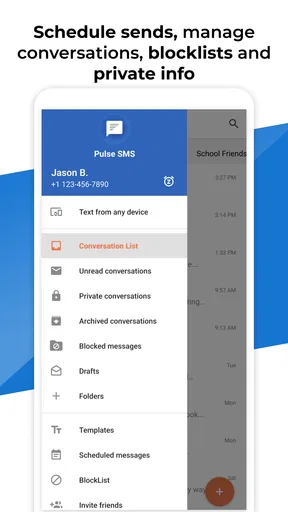
The original review calls out password-protected private conversations, message search, scheduling, and theme choices. I see these as different kinds of control: a private-conversation lock is about casual access, search is about finding information I have already received, and scheduling is about choosing when a message goes out. They can make SMS easier to manage, but none should be confused with control over what a recipient does with a message after it arrives.
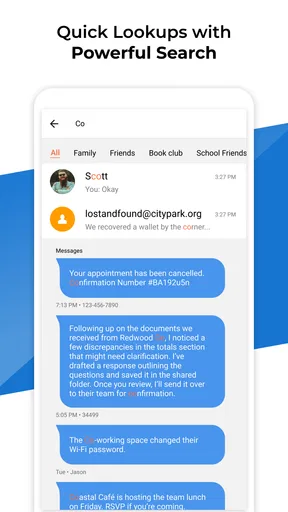
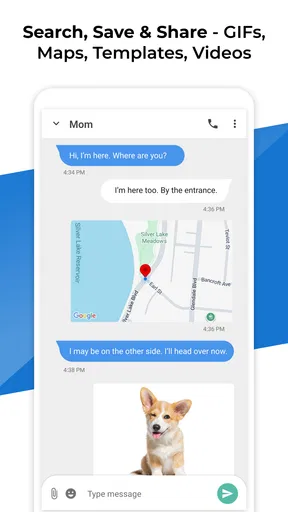
Search is particularly handy when a text contains a practical detail I need again, such as an address or an appointment time. My tip is to search for a distinctive word rather than trying to remember the exact phrasing of an old message. This turns a long conversation history into something more usable. The flip side is that searchable history is still personal history, so I would use a device lock and be thoughtful about which screens or accounts remain accessible to other people.
Scheduling can also prevent a small social misstep. If I remember a birthday late at night, I can prepare a message for a more considerate time instead of sending it immediately. Before relying on a scheduled text for something important, I would check that the time and recipient are right and leave enough room to send it manually if the message is time-sensitive. Scheduling is a convenience, not a reason to assume a critical message has been delivered or read.
For a sensitive exchange, I would pause before assuming that password protection makes the conversation suitable for confidential material. A passcode can deter someone casually opening the app on an accessible device, but it does not change the nature of SMS or guarantee that every connected device is private. I would keep financial credentials, account recovery codes, and similarly sensitive information out of ordinary texts wherever possible.
How it compares with the usual alternatives
Compared with a basic texting app that stays on one phone, Pulse SMS offers a more flexible way to continue conversations from a tablet or computer. The difference matters most to people who type a lot, keep a tablet nearby, or dislike checking a phone every few minutes. If I only send occasional texts and already find my phone’s default app straightforward, adding another setup may not repay the effort.
It also serves a different purpose from internet-based chat apps. Those services can be better for people whose conversations already happen in a particular group chat platform, especially when everyone they need to reach is there. Pulse SMS is aimed at managing text conversations, so it makes more sense when contacts still reach me by SMS and I want those exchanges on more than one screen. I would not choose it expecting it to replace every messaging service or bring all my chats into one universal inbox.
The app’s extra conveniences are useful, but they bring their own decisions. Themes can make the interface feel more personal, yet appearance matters less than choosing notification behavior and connected devices carefully. Private conversations may help with casual privacy, but they are not a substitute for selecting a suitable secure channel. I like that these functions address real texting habits; I would simply use each for what it can reasonably do.
Who is likely to enjoy it, and who may not
I would recommend giving Pulse SMS a look if SMS is a regular part of your day and you often move between an Android phone, a tablet, and a computer. It is especially appealing if typing replies on a full keyboard saves you time, or if searching old texts is part of how you keep track of practical details. The scheduled-message option is another small but meaningful fit for someone who drafts texts at one hour and wants them sent at a more appropriate one.
I would skip it if I rarely text, do not want an account or additional device setup, or prefer to keep message access confined to one phone. I would also choose another approach if my priority is a specific security guarantee that I have not independently verified for this app, or if nearly all my conversations already happen in other messaging services. More devices can make texting easier, but they also mean more places to consider when protecting a conversation.
What to check before settling in
Pulse SMS is free to start, but optional purchases mean I would check the in-app choices before committing to any paid feature. Its current version is 6.10.0.3034, and it requires Android 6.0 or later. If I am setting it up on an older device, I would first confirm that the app is compatible and that the device can handle the version available to it. The product is presented for phone, tablet, and web use, while the listed minimum operating-system requirement is specifically for Android.
I would also test the workflow with a low-stakes conversation before depending on it for an important message. Send and receive a normal text, check how notifications appear on each device, try finding an older detail with search, and see whether the setup feels comfortable. This is a better test than judging the app only by its interface: the real value depends on whether the devices I actually use stay convenient without making message access feel careless.
My cautious verdict
The original review found the interface clean and the everyday performance smooth, and its feature set makes a practical case for people who want SMS beyond a phone screen. I would keep expectations grounded: syncing is the central convenience, while scheduling, search, themes, notifications, and password-protected conversations support particular habits rather than transforming texting itself. Maple Media’s app has been available since November 15, 2016, and its current version is 6.10.0.3034; I would still judge it by how well it fits my present devices and routines.
My recommendation is conditional but straightforward. If you text often and want the freedom to answer from a tablet or computer, Pulse SMS is worth trying, with a little care around connected devices and message previews. If your needs are basic or your conversations call for privacy assurances beyond ordinary SMS controls, your existing phone app or a purpose-built secure messenger may suit you better. I like the convenience most when I use it intentionally: connect the devices I trust, keep notifications sensible, and treat a private-conversation lock as one helpful boundary, not a blanket promise.
If you're like me, constantly juggling between devices, you'll know how crucial a seamless messaging experience is. Enter Pulse SMS. This app promises to be your ultimate messaging companion across all your devices, and spoiler alert – it delivers.
Getting Started with Pulse SMS
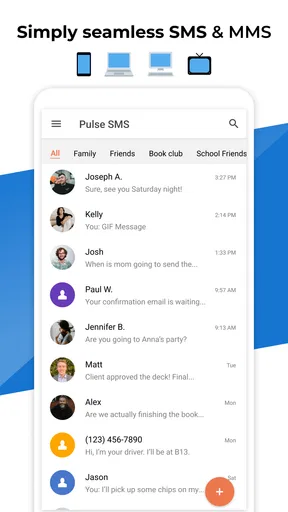
Setting up Pulse SMS is as easy as pie. Once you download it from your app store – whether you're team Android or iOS, they've got you covered – you'll be prompted to set up an account. The process is straightforward, and within minutes, you're ready to start texting away. What's cool is that it syncs your messages across your phone, tablet, and even the web. So, no more switching devices and losing track of your conversations. It's like having your cake and eating it too!
Features That Make Your Life Easier
Okay, let's talk features. The app doesn't just stop at syncing; it adds a sprinkle of magic that makes messaging fun and functional.
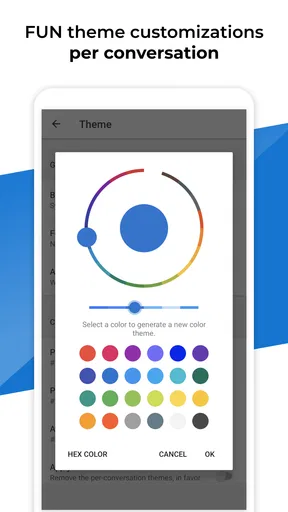
- Customizable Themes: Love a bit of personalization? Pulse SMS lets you pick themes to suit your mood. It's like dressing your app for the occasion!
- Schedule Messages: Ever remembered a friend's birthday at midnight and didn't want to wake them up with a text? Schedule it for the next morning!
- Search Functionality: The search feature is spot-on. Finding an old message or contact is a breeze.
- Private Conversations: For those secret chats, the app offers password protection. It's like having a confidential envelope in your digital world.
Performance and User Experience
Performance-wise, Pulse SMS is a champ. It runs smoothly, and I didn't encounter any hiccups during my time with it. The interface is clean, intuitive, and just feels right. Whether you're on your phone or typing away on your laptop, the transition is seamless. It's like the app knows exactly what you need.
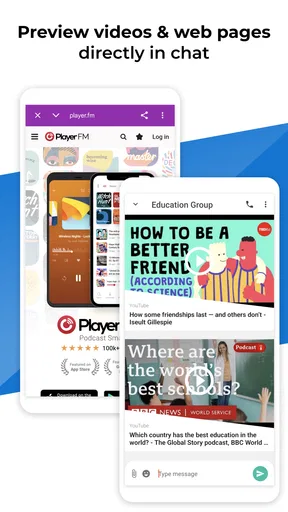
The notifications are timely, and you can customize them to avoid unnecessary distractions. Plus, it supports group messaging and multimedia messages, so you're not missing out on any feature you'd expect from a top-tier messaging app.
Why You Should Consider Pulse SMS
If you're still on the fence, let me give you a little nudge. Pulse SMS is not just a messaging app; it's a lifestyle upgrade. For someone who often switches between devices, this app is a lifesaver. The ability to send and receive texts from any device is a game-changer.
Moreover, the app's privacy features are commendable. In a world where data privacy is becoming increasingly important, Pulse SMS offers peace of mind with its secure messaging.
And here's the cherry on top: there's no spam. Unlike other apps that bombard you with ads, Pulse SMS provides a clean, ad-free experience. It's refreshing, to say the least.
Final Thoughts
In conclusion, if you're looking for a reliable, feature-rich messaging app that syncs across all your devices, Pulse SMS should be at the top of your list. It checks all the boxes – from functionality to user experience, and it does so with style.
So, why not give it a shot? Download it, try it out, and see how it transforms your messaging experience. Trust me, once you go Pulse, there's no going back!
Pros
- Cross-platform syncing available.
- Highly customizable interface.
- Supports various message formats.
- Backup and restore feature.
- Secure end-to-end encryption.
Cons
- Limited free version features.
- Occasional syncing delays.
- Subscription required for full access.
- No video call support.
- Ads in the free version.
FAQs for Pulse SMS (Phone/Tablet/Web)
What is Pulse SMS and how does it work?
Pulse SMS is a versatile messaging app that allows users to send and receive SMS and MMS messages across multiple devices. It works by syncing your messages through the cloud, enabling access from your phone, tablet, and even your web browser. With Pulse SMS, you can enjoy a seamless messaging experience across all your devices.
Is Pulse SMS secure and private?
Yes, Pulse SMS prioritizes security and privacy. The app encrypts messages to ensure your conversations remain private. Additionally, it does not collect or store your personal data on its servers. This focus on privacy makes Pulse SMS a reliable choice for users concerned about the security of their messages.
Does Pulse SMS support customization and personalization options?
Pulse SMS offers extensive customization options, allowing users to personalize their messaging experience. You can change themes, customize conversation colors, and set custom notifications for different contacts. These personalization features help tailor the app to fit your unique style and preferences.
Can I use Pulse SMS without an internet connection?
While Pulse SMS requires an internet connection for syncing messages across devices, you can still send and receive SMS messages on your phone without internet access. The app functions like a standard SMS app in offline mode, ensuring you can stay connected even without data or Wi-Fi.
Are there any costs associated with using Pulse SMS?
Pulse SMS has a free version with basic features available for everyone. However, for advanced features like cloud syncing and multi-device support, a subscription is required. The subscription is reasonably priced and provides access to premium features that enhance the overall messaging experience.


